In our previous Post we have learn How to use CRUD(create read update delete) in angular With PHP ? Now in this post we will learn How to do Paging with Php using AngularJS or can say paging with AngularJS using Php.
Our Blog Regarding Iteration Angular JS with PHP teaches you :
How to -
- Add Product
- Edit Product
- Delete Product
- View Product in Grid Form using Angular JS and PHP.
Now we move to next part of this topic to achive filteration and paging on grid view of products we achieve in our first part of this title.
To Filter and Paging Data using PHP and Angular JS We have to follow following Steps:
First Step :
-
First , we create a html for filter box in the same html file used in part-1 of this example name “angular_example.html” using below code:
<input type="text" ng-model="search" ng-change="filter()" placeholder="Filter" class="form-control" /> - ng-change property of angular js will call function filter defined in contoller.js file as used same in part-1 of this example using below code:
listApp.filter('startFrom', function() { return function(input, start) { if(input) { start = +start; //parse to int return input.slice(start); } return []; } }); -
This filter function get the value of text we place in search box or filter box for filteration and slice by their start index to end index to filter info on text change very frequently.
- Now, we are moving for our next step which teach you how to implement paging using angular js.
Step-2
-
To Achieve Paging, We have to first declare some variables in function which gets all records from database using php and angular js defined in controller.js
-
if you forgot this don’t bother , we are sohowing below the snippet of the function which will helps you in remembering the past step you performed in part-1 of this example.
$scope.get_product = function(){ $http.get("db.php?action=get_product").success(function(data) { //$scope.product_detail = data; $scope.pagedItems = data; }); } -
so, if you got it here, we will move to next if you don’t please check the link below for part-1 of same blog .
http://tech-blog.maddyzone.com/javascript/perform-addeditdeleteview-php-using-angular-js.
-
Now as we say, we have to initialize some variable in this function to implement paging so for you please check below variables with comment (specify the use of these variables).
  $scope.currentPage = 1; //current page
  $scope.entryLimit = 5; //max no of items to display in a page
  $scope.filteredItems = $scope.pagedItems.length; //Initially for no filter
  $scope.totalItems = $scope.pagedItems.length;
so now complete code for this function is as below :
$scope.get_product = function(){
    $http.get("db.php?action=get_product").success(function(data)
    {
        //$scope.product_detail = data;
        $scope.pagedItems = data;
        $scope.currentPage = 1; //current page
        $scope.entryLimit = 5; //max no of items to display in a page
        $scope.filteredItems = $scope.pagedItems.length; //Initially for no filter
        $scope.totalItems = $scope.pagedItems.length;

    });
}
-
Including this we have to define 2 new function to check the current page and filter value during paging so, we are creating here 2 new function in the same file controller.js with below code:
// function to set current page $scope.setPage = function(pageNo) { $scope.currentPage = pageNo; }; // function to get filtered data $scope.filter = function() { $timeout(function() { $scope.filteredItems = $scope.filtered.length; }, 10); }; -
As you have implemented the paging and filteration function successfully, you are now able to check complete code of controller.js here.
var listApp = angular.module('listpp', ['ui.bootstrap']); listApp.filter('startFrom', function() { return function(input, start) { if(input) { start = +start; //parse to int return input.slice(start); } return []; } }); /* variable listApp is a variable which used to control the array values to show the data to show in view using the module name 'listApp' with arguments as an array */ /* Initialize the controller by name 'PhoneListCtrl' holds the information of phone in form of array with keys name, snipper, price , quantity */ /* $scope argument passed in function is a key arguments should be passed with exactly the same name */ listApp.controller('PhoneListCtrl', function ($scope,$http) { $scope.filteredItems = []; $scope.groupedItems = []; $scope.itemsPerPage = 3; $scope.pagedItems = []; $scope.currentPage = 0; $scope.phones = [ { 'name': 'Mexus S', 'snippet': 'Fast just got faster with Nexus S.', 'price':30, 'quantity':50 }, { 'name': 'Samsung Tablet™ with Wi-Fi', 'snippet': 'The Next, Next Generation tablet.', 'price':30, 'quantity':60 }, { 'name': 'Soney Xperia™', 'snippet': 'The Next, Next Generation Phone.', 'price':30, 'quantity':70 } ]; /** Scope argument specify the function by name remove and passed index of list item as a parameter , which splice the list by 1 , as click on remove button **/ $scope.remove = function (index) { $scope.phones.splice(index,1); } $scope.funding = { startingEstimate: 0 }; $scope.computeNeeded = function() { $scope.needed = $scope.funding.startingEstimate * 10; }; /** Check if value for funding is 0 or more **/ $scope.requestFunding = function() { if( $scope.needed == "" || !$scope.needed ) window.alert("Sorry, please get more customers first."); }; $scope.reset = function() { $scope.funding.startingEstimate = 0; $scope.needed = 0; }; /** toggleMenu Function to show menu by toggle effect , by default the stage of the menu is false as we click on toggle button, we make it to true or show and reverse on anothe click event. **/ $scope.menuState = false; $scope.add_prod = true; $scope.toggleMenu = function() { if($scope.menuState) { $scope.menuState= false; } else { $scope.menuState= !$scope.menuState.show; } }; /** function to get detail of product added in mysql referencing php **/ $scope.get_product = function(){ $http.get("db.php?action=get_product").success(function(data) { //$scope.product_detail = data; $scope.pagedItems = data; $scope.currentPage = 1; //current page $scope.entryLimit = 5; //max no of items to display in a page $scope.filteredItems = $scope.pagedItems.length; //Initially for no filter $scope.totalItems = $scope.pagedItems.length; }); } $scope.setPage = function(pageNo) { $scope.currentPage = pageNo; }; $scope.filter = function() { $timeout(function() { $scope.filteredItems = $scope.filtered.length; }, 10); }; $scope.sort_by = function(predicate) { $scope.predicate = predicate; $scope.reverse = !$scope.reverse; }; /** function to add details for products in mysql referecing php **/ $scope.product_submit = function() { $http.post('db.php?action=add_product', { 'prod_name' : $scope.prod_name, 'prod_desc' : $scope.prod_desc, 'prod_price' : $scope.prod_price, 'prod_quantity' : $scope.prod_quantity } ) .success(function (data, status, headers, config) { alert("Product has been Submitted Successfully"); $scope.get_product(); }) .error(function(data, status, headers, config){ }); } /** function to delete product from list of product referencing php **/ $scope.prod_delete = function(index) { var x = confirm("Are you sure to delete the selected product"); if(x){ $http.post('db.php?action=delete_product', { 'prod_index' : index } ) .success(function (data, status, headers, config) { $scope.get_product(); alert("Product has been deleted Successfully"); }) .error(function(data, status, headers, config){ }); }else{ } } /** fucntion to edit product details from list of product referencing php **/ $scope.prod_edit = function(index) { $scope.update_prod = true; $scope.add_prod = false; $http.post('db.php?action=edit_product', { 'prod_index' : index } ) .success(function (data, status, headers, config) { //alert(data[0]["prod_name"]); $scope.prod_id = data[0]["id"]; $scope.prod_name = data[0]["prod_name"]; $scope.prod_desc = data[0]["prod_desc"]; $scope.prod_price = data[0]["prod_price"]; $scope.prod_quantity = data[0]["prod_quantity"]; }) .error(function(data, status, headers, config){ }); } /** function to update product details after edit from list of products referencing php **/ $scope.update_product = function() { $http.post('db.php?action=update_product', { 'id' : $scope.prod_id, 'prod_name' : $scope.prod_name, 'prod_desc' : $scope.prod_desc, 'prod_price' : $scope.prod_price, 'prod_quantity' : $scope.prod_quantity } ) .success(function (data, status, headers, config) { $scope.get_product(); alert("Product has been Updated Successfully"); }) .error(function(data, status, headers, config){ }); } }); -
Now as we created and updated all needed function with respective variables now we will move to our next step how to use these function in front end or on html file(angular_example.html).
Step-3
-
This Step is last step to present filter and paged data on view end.
-
To show or implement paged data we use following snippet code :
<tr ng-repeat="product in filtered = (pagedItems | filter:search | startFrom:(currentPage-1)*entryLimit | limitTo:entryLimit"> <td></td> <td></td> <td></td> <td></td> <td></td> <td><a href="" ng-click="prod_edit(product.id)">Edit</a> | <a href="" ng-click="prod_delete(product.id)">Delete</a></td> </tr> -
If you can see this is the same snippet with updated code of paging which we used to show all items from database in part-1 of same blog.
- Now we update here te array from pagedItems to
- filtered with parameters pagedItems (total items from database)
- filter:search use the filter function with filtered text for pagination if filter box is blank than all items will come , otherwise items which full fill the criteria of filtered text will come on view end from controller.js.
- startFrom , use to show dataitems from where it will start using current page end limit for number of items to show on view table.
-
Rest part is same as in previous case.
-
To Present paging link we follow the following html structure.
As you have implemented the paging and filteration successfully, you are now able to check complete code of html here.
<!DOCTYPE html>
<html ng-app="listpp" ng-app lang="en">
<head>
<meta charset="utf-8">
<link href="css/bootstrap.min.css" rel="stylesheet">
<style type="text/css">
ul>li, a{cursor: pointer;}
</style>
<title>Angular With PHP</title>
<script src="https://ajax.googleapis.com/ajax/libs/angularjs/1.2.6/angular.min.js">
</script>
<script src="controller.js"></script>
</head>
<body>
<div class="navbar navbar-default" id="navbar">
<div class="container" id="navbar-container">
<div ng-controller="PhoneListCtrl">
<div class="wrapper">
<h4 align="center"> Angular Basic Example </h4>
<label>Name:</label>
<!-- ng-model is used to specify the model name to which used to use module as an object to present data in view -->
<input type="text" ng-model="yourName" placeholder="Enter Text Here">
<!-- -->
<!-- Module as an object to show value in text box to present in html with attribute uppercase to show all text box data in uppercase. -->
<br/>
<br/>
<table border=1>
<thead>
<th>Phone Name</th>
<th>Phone Description</th>
<th>Phone Price</th>
<th>Phone Quantity</th>
<th>Total Price with Quantity</th>
<th>Action</th>
</thead>
<!-- dd-MMMM-yy HH:mm:ss a -->
<!-- -->
<!-- currency attribute to show text box data with $ currency by default, if only integer value enter in textbox -->
<tr ng-repeat="phone in phones | orderBy :'price*quantity':reverse=false | limitTo:3 | filter : yourName">
<!-- ng-repeat used to call array values defined in controller to get one by one and phone is used as key value and phones represent the array name in controller file -->
<!-- orderBy Attribute used to show data in ascending order by default, to show data in reverse order, desc , we have to mention if reverse to be true or false, by mentioning the reverse true, data will presented in reverse order. -->
<!-- Limit to attribute used to show only specific records data in html as mentioned by number -->
<!-- filter attribute used to present records, filter by value enter in text box -->
<td></td>
<td></td>
<td></td>
<td></td>
<td></td>
<!-- Remove function used to remove an item from an array defined in controller,with their index value in list repeat by ng-repeat, if order by reverse set to be true, than function remove value in order from bottom to top as per index, else remove value from top to bottom Remove function also defined in controller -->
<td><button ng-click='remove($index)'>Remove</button></td>
<!-- table showing the array values defined in controller by key attribute -->
</tr>
</table>
<hr>
</div>
<br/>
<br/>
<form class="wrapper">
Starting:<input ng-change="computeNeeded()" ng-model="funding.startingEstimate">
Recommendation:
<!-- ng-submit to call function requestFunding defined in Controller , when button is pressed -->
<button ng-click="requestFunding()">Fund my startup!</button>
<!-- Reset button is to reset the value of fund to "0" after click, reset function is defined in controller and starting Estimate sets to 0 on click -->
<button ng-click="reset()">Reset</button>
<!-- Toggle Menu Buttom is used to show menu by toggle effect using ng-show property , function defined in controller by name toggleMenu, which called after click on button -->
<button ng-click='toggleMenu()'>Toggle Menu</button>
<ul ng-show='menuState'>
<li>Stun</li>
<li>Disintegrate</li>
<li>Erase from history</li>
</ul>
</form>
<br/>
<br/>
<hr>
<h4 align="center">Add Product</h4>
<form name="add_product" class="wrapper">
<input type="hidden" name="prod_id" ng-model="prod_id">
<input type="text" name="prod_name" ng-model="prod_name" placeholder="Enter Product Name">
<input type="text" name="prod_desc" ng-model="prod_desc" placeholder="Enter Product Description">
<input type="text" name="prod_price" ng-model="prod_price" placeholder="Enter Product Price">
<input type="text" name="prod_quantity" ng-model="prod_quantity" placeholder="Enter Product Quantity">
<input type="button" name="submit_product" ng-show='add_prod' value="Submit" ng-click="product_submit()">
<input type="button" name="update_product" ng-show='update_prod' value="Update" ng-click="update_product()">
</form>
<br/>
<!-- <h4>Search Product</h4>
<div class="input-append">
<input type="text" ng-model="product_name" ng-change="search()" class="input-large search-query" placeholder="Search for a Product">
<span class="add-on"><i class="icon-search"></i></span>
</div> -->
<br/>
<br/>
<br/>
<div class="row">
<div class="col-md-2">PageSize:
<select ng-model="entryLimit" class="form-control">
<option>5</option>
<option>10</option>
<option>20</option>
<option>50</option>
<option>100</option>
</select>
</div>
<div class="col-md-3">Filter:
<input type="text" ng-model="search" ng-change="filter()" placeholder="Filter" class="form-control" />
</div>
<div class="col-md-4">
<h5>Filtered of total products</h5>
</div>
</div>
<br/>
<div class="row">
<div class="col-md-12" ng-show="filteredItems > 0">
<table class="table table-striped table-bordered">
<thead>
<th>ID <a ng-click="sort_by('id');"></a></th>
<th>Product Name <a ng-click="sort_by('prod_name');"></a></th>
<th>Product Description <a ng-click="sort_by('prod_desc');"></a></th>
<th>Product Price <a ng-click="sort_by('prod_price');"></a></th>
<th>Product Quantity <a ng-click="sort_by('prod_quantity');"></a></th>
<th>Action</th>
</thead>
<tbody ng-init="get_product()">
<tr ng-repeat="product in filtered = (pagedItems | filter:search | orderBy : predicate :reverse) | startFrom:(currentPage-1)*entryLimit | limitTo:entryLimit">
<td></td>
<td></td>
<td></td>
<td></td>
<td></td>
<td><a href="" ng-click="prod_edit(product.id)">Edit</a> | <a href="" ng-click="prod_delete(product.id)">Delete</a></td>
</tr>
</tbody>
</table>
</div>
<div class="col-md-12" ng-show="filteredItems == 0">
<div class="col-md-12">
<h4>No customers found</h4>
</div>
</div>
<div class="col-md-12" ng-show="filteredItems > 0">
<div pagination="" page="currentPage" on-select-page="setPage(page)" boundary-links="true" total-items="filteredItems" items-per-page="entryLimit" class="pagination-small" previous-text="«" next-text="»"></div>
</div>
</div>
</div>
</div>
<script src="js/ui-bootstrap-tpls-0.10.0.min.js"></script>
</body>
</html>
Hey , You are now able to perform all add/edit/delete/view/search/paging action using angular js with php.
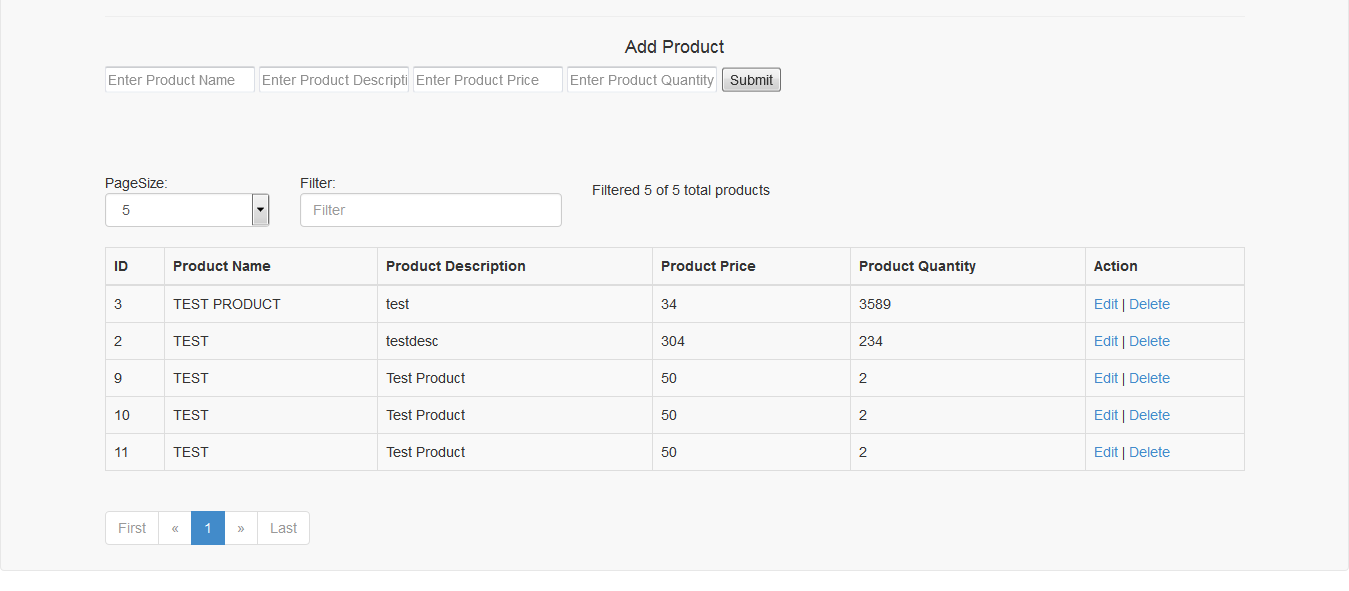
please check the below snapshot with required output .