How to use CRUD(create read update delete) in angular With PHP ?
Our Blog Regarding Interaction Angular JS with PHP teaches you :
How to -
- Add Product
- Edit Product
- Delete Product
- View Product in Grid Form using below Example using Angular JS and PHP.
To Interact Angular JS with PHP We have to follow following Steps:
First Step :
-
First , we have to create a database wih name “Shopping” while open phpmyadmin after starting “Xampp or Wamp Server” for PHP.
-
We will follow the below Database Structure as mention in snapshot.
Database Structure
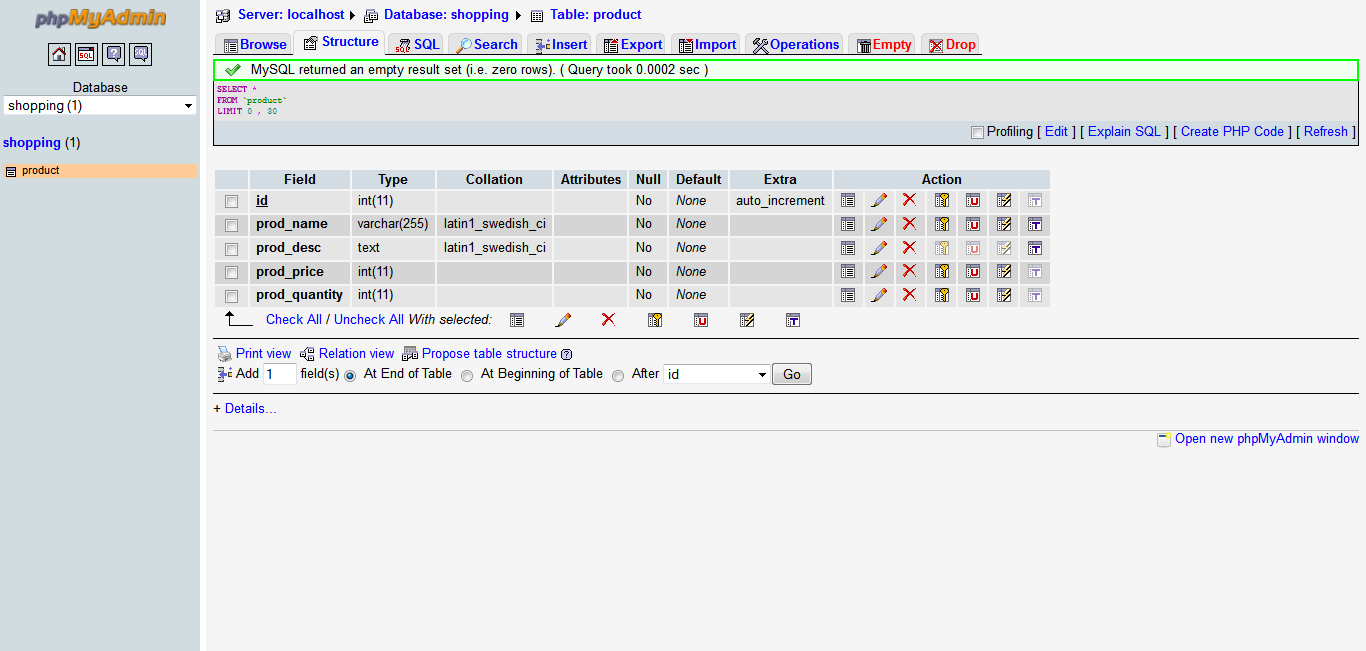
Snapshot showing a table name as “product”, having fields like :
- id (Unique and Auto increment ID field for a product)
- prod_name (Field having value of Name of Product)
- prod_price (Field having value of Price of Product)
- prod_quantity (Field having value of Total Quantity of Product)
after creating this table in phpmyadmin we completed database for our example. Now the next step is how we will use this database structure in our most required example.
Second Step :
-
For this, we simply create a below folder structure in htdocs folder of Xampp Server.
-
Folder name showing angular example like : angular_example
-
After creating a folder we create our first php file for this by name “config.php” in this folder. config.php file have below detail for database connectivity with database we created in First Step:
Config.php file
<?php

/****** Database Details *********/

$host = "localhost";
$user = "root";
$pass = "";
$database = "shopping";
$con = mysql_connect($host,$user,$pass);

if (!$con) {
die('Could not connect: ' . mysql_error());
}

//echo 'Connected successfully';

mysql_select_db($database,$con);

/*******************************/

?>
-
Now we create a new html file for our example which have html using form tag to show “Form GUI” on web page to interact with user for adding product and other action.
-
So for this our third step starts here:
Third Step :
- We crate a html file by name “angular_example.html”.
- angular_example.html file have html for form to Add Product and other action , as we have to add product using angular js and php so we have to include angular js firstly in our html.
-
To include angular js we follow the below statement :
-
To Performing Angular Action we will use controller.js, we will discuss more about controller.js, later in next step.
- By using the below code , we created an html structure of form to add product.
<!doctype html> <html lang="en"> <head> <meta charset="UTF-8"> <title>Angular With PHP</title> <script src="https://ajax.googleapis.com/ajax/libs/angularjs/1.2.6/angular.min.js"> </script> <script src="controller.js"></script> </head> <body> <h4 align="center">Add Product</h4> <form name="add_product" class="wrapper"> <input type="hidden" name="prod_id"> <input type="text" name="prod_name" placeholder="Enter Product Name"> <input type="text" name="prod_desc" placeholder="Enter Product Description"> <input type="text" name="prod_price" placeholder="Enter Product Price"> <input type="text" name="prod_quantity" placeholder="Enter Product Quantity"> <input type="button" name="submit_product" value="Submit"> </form> </body> </html> - Now the question arises , how angular js will work here, Dear if you know basis of angular js than it so easier to use angular js with html to perform submit form and get field values using property
ng-controllerto specify controller for html page we have created where angular will call for first stage. If you are stuck here then please follow this link to learn angular js basis fundamentals:
http://maddyzone.com/javascript/learn-complete-angularjs-in-5-steps-part-1
If you are familier with angular js then we now move to our next step:
Fourth Step :
-
Here we create a new file named as “controller.js” in the same folder.
- controller.js file have name of controller “PhoneListCtrl” using “listapp” module, which controlles the viewing of data on html and get data from html for form elements.
var listApp = angular.module('listpp', []); listApp.controller('PhoneListCtrl', function ($scope) { }); - Controller “PhoneListCtrl” will have scope function to add/edit/delete/product data to database table we created in first step and to show data on html in grid form.
Now the question will arise in your mind how client side controller will interact to server side database?
My dear , to do this, we pass an attribute $http with scope variable in contoller function as below :
listApp.controller('PhoneListCtrl', function ($scope , $http) {
$httpis most important or key of this precious example, used to get and post data from database and to send data to database respectively using php (Server side scripting language) and an interface has been created between client side and server side for interaction.
Now Our Next Step will come which shows you how $http is used for interaction, so now next step is …. Fifth Step:
-
In this step , we create a php file name as “db.php” in same folder.
-
db.phpfile at first interact with database connection establishment, so for this we include our config.php file , which we created in step-2 by below code :include(‘config.php’);
-
After Establisment an connection with database, “db.php” will get action from our angular js controller named “controller.js” to check if a form action is performed or not?
-
Now you are thinking how i send an action and what action i have to send from html to controller.js ?
-
So now we will send form submit action to controller by below code which will later retrive on db.php
$scope.product_submit = function() { $http.post('db.php?action=add_product', { 'prod_name' : $scope.prod_name, 'prod_desc' : $scope.prod_desc, 'prod_price' : $scope.prod_price, 'prod_quantity' : $scope.prod_quantity } ) .success(function (data, status, headers, config) { alert("Product has been Submitted Successfully"); $scope.get_product(); }) .error(function(data, status, headers, config){ }); } -
After seeing this code you got stuck ohh!
-
How it is, so don’t stuck here , its so easy for you:
-
We just create a product_submit action from html by below code , and this action gets the values of form element using $scope variable.
-
As you see $http.post method is used to send form data to db.php with action name as “add_product” itself representing to add product.
-
Now you can check how html for form is for this so you can check below the code :
<form name="add_product" class="wrapper"> <input type="hidden" name="prod_id" ng-model="prod_id"> <input type="text" name="prod_name" ng-model="prod_name" placeholder="Enter Product Name"> <input type="text" name="prod_desc" ng-model="prod_desc" placeholder="Enter Product Description"> <input type="text" name="prod_price" ng-model="prod_price" placeholder="Enter Product Price"> <input type="text" name="prod_quantity" ng-model="prod_quantity" placeholder="Enter Product Quantity"> <input type="button" name="submit_product" ng-show='add_prod' value="Submit" ng-click="product_submit()"> </form> -
$scope.prod_nameshowing the ng-model attribute of angular js to get field value by callingproduct_submitfunction mention by code above in html for button.
= By using this function we will get the values of form fields in db.php by reteriving the action name from the url and using below code:
switch($_GET['action']) {
case 'add_product' :
add_product();
break;
-
As we get an action add_product using switch case for other action as well like edit/delete/view product , to add a product we call a function in db.php add_product.
-
add_product function get fields value which are json encoded from angular js file name “controller.js” by function product_submit.
-
so , our first step to get fields values in a variable to save into database, for this we have to decode the json first.
-
To decode the json we will use the below code:
$data = json_decode(file_get_contents("php://input")); -
Now all form fields value are in $data object by key name as we specify in product_submit function in controller.js if you remind?
-
To remeber you we are pasting the snippet below :
  'prod_name'     : $scope.prod_name,
  'prod_desc'     : $scope.prod_desc,
  'prod_price'    : $scope.prod_price,
  'prod_quantity' : $scope.prod_quantity
word written in ‘‘(single quote) representing the keys.
So, now it easier for you here to get the values in php variables by using below code :
    $prod_name = $data->prod_name;
    $prod_desc = $data->prod_desc;
    $prod_price = $data->prod_price;
    $prod_quantity = $data->prod_quantity;
yeah !! here you get success to getting data from html to php using angular js.
-
To add this fields values in our product table of shopping database so easier for you using the below code
  $qry = 'INSERT INTO product (prod_name,prod_desc,prod_price,prod_quantity) values ("' . $prod_name . '","' . $prod_desc . '",' .$prod_price . ','.$prod_quantity.')';

  $qry_res = mysql_query($qry);
  if ($qry_res) {
  $arr = array('msg' => "Product Added Successfully!!!", 'error' => '');
  $jsn = json_encode($arr);
  // print_r($jsn);
  }
  else {
  $arr = array('msg' => "", 'error' => 'Error In inserting record');
  $jsn = json_encode($arr);
  // print_r($jsn);
  }
So complete add product function now is as :
function add_product() {
$data = json_decode(file_get_contents("php://input"));
$prod_name = $data->prod_name;
$prod_desc = $data->prod_desc;
$prod_price = $data->prod_price;
$prod_quantity = $data->prod_quantity;

print_r($data);
$qry = 'INSERT INTO product (prod_name,prod_desc,prod_price,prod_quantity) values ("' . $prod_name . '","' . $prod_desc . '",' .$prod_price . ','.$prod_quantity.')';

$qry_res = mysql_query($qry);
if ($qry_res) {
$arr = array('msg' => "Product Added Successfully!!!", 'error' => '');
$jsn = json_encode($arr);
// print_r($jsn);
}
else {
$arr = array('msg' => "", 'error' => 'Error In inserting record');
$jsn = json_encode($arr);
// print_r($jsn);
}
}
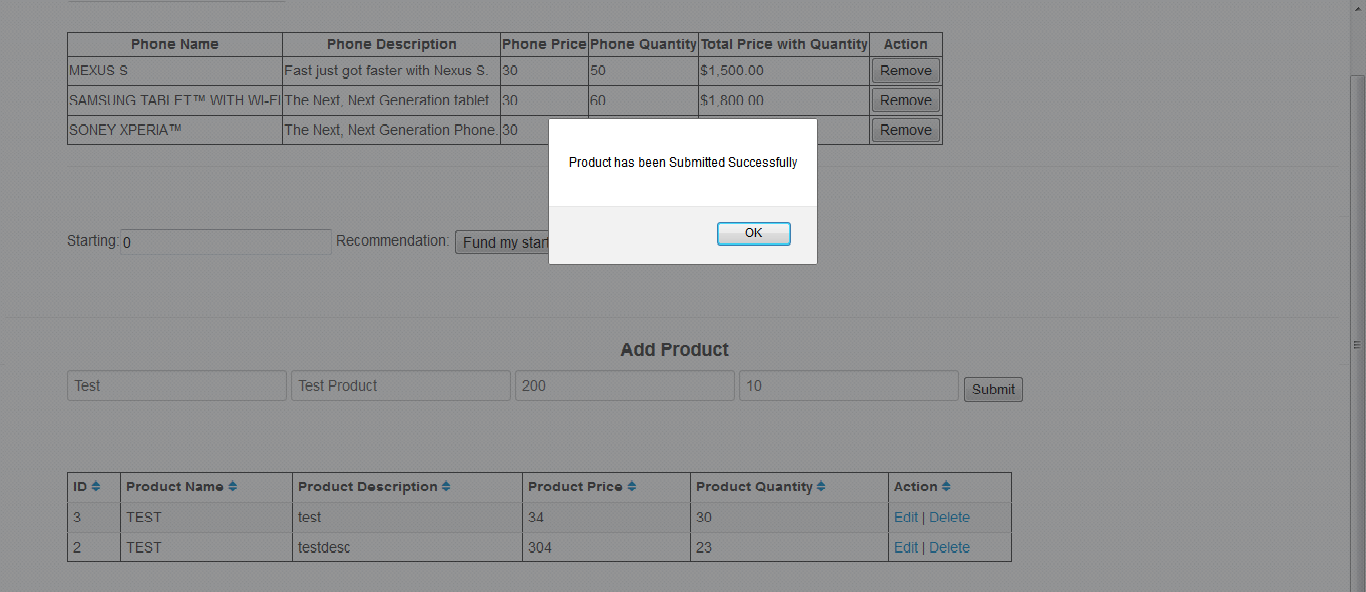
In the same way you can work for update / delete form data by creating function for update and delete in db.php and controller.js. Now Next Step is how to show data to html which we save in database using db.php using angular js to complete our motto of this example.
so for this we are on final step of this precious example as with next step:
Sixth Step:
-
To view or show data on html what we have save using product_submit method of controller.js file and add_product method of db.php file in fifth step we create a function by name get_product in db.php using below code :
function get_product() { $qry = mysql_query('SELECT * from product'); $data = array(); while($rows = mysql_fetch_array($qry)) { $data[] = array( "id" => $rows['id'], "prod_name" => $rows['prod_name'], "prod_desc" => $rows['prod_desc'], "prod_price" => $rows['prod_price'], "prod_quantity" => $rows['prod_quantity'] ); } print_r(json_encode($data)); return json_encode($data); } -
get_product() function get data from db using php in array form but we need this data in json form to show on html using angular js, so first we convert array of data of all records or product we added using add_product and after performing other action like edit/delete.
-
As we get json data we return json data by return statement of this function as code below :
return json_encode($data); -
Now you can get the complete db.php file here.
db.php file
<?php

include('config.php');

/** Switch Case to Get Action from controller **/

switch($_GET['action']) {
case 'add_product' :
add_product();
break;

case 'get_product' :
get_product();
break;

case 'edit_product' :
edit_product();
break;

case 'delete_product' :
delete_product();
break;

case 'update_product' :
update_product();
break;
}

/** Function to Add Product **/

function add_product() {
$data = json_decode(file_get_contents("php://input"));
$prod_name = $data->prod_name;
$prod_desc = $data->prod_desc;
$prod_price = $data->prod_price;
$prod_quantity = $data->prod_quantity;

print_r($data);
$qry = 'INSERT INTO product (prod_name,prod_desc,prod_price,prod_quantity) values ("' . $prod_name . '","' . $prod_desc . '",' .$prod_price . ','.$prod_quantity.')';

$qry_res = mysql_query($qry);
if ($qry_res) {
$arr = array('msg' => "Product Added Successfully!!!", 'error' => '');
$jsn = json_encode($arr);
// print_r($jsn);
}
else {
$arr = array('msg' => "", 'error' => 'Error In inserting record');
$jsn = json_encode($arr);
// print_r($jsn);
}
}

/** Function to Get Product **/

function get_product() {
$qry = mysql_query('SELECT * from product');
$data = array();
while($rows = mysql_fetch_array($qry))
{
$data[] = array(
"id" => $rows['id'],
"prod_name" => $rows['prod_name'],
"prod_desc" => $rows['prod_desc'],
"prod_price" => $rows['prod_price'],
"prod_quantity" => $rows['prod_quantity']
);
}
print_r(json_encode($data));
return json_encode($data);
}

/** Function to Delete Product **/

function delete_product() {
$data = json_decode(file_get_contents("php://input"));
$index = $data->prod_index;
//print_r($data) ;
$del = mysql_query("DELETE FROM product WHERE id = ".$index);
if($del)
return true;
return false;
}

/** Function to Edit Product **/

function edit_product() {
$data = json_decode(file_get_contents("php://input"));
$index = $data->prod_index;
$qry = mysql_query('SELECT * from product WHERE id='.$index);
$data = array();
while($rows = mysql_fetch_array($qry))
{
$data[] = array(
"id" => $rows['id'],
"prod_name" => $rows['prod_name'],
"prod_desc" => $rows['prod_desc'],
"prod_price" => $rows['prod_price'],
"prod_quantity" => $rows['prod_quantity']
);
}
print_r(json_encode($data));
return json_encode($data);
}

/** Function to Update Product **/

function update_product() {
$data = json_decode(file_get_contents("php://input"));
$id = $data->id;
$prod_name = $data->prod_name;
$prod_desc = $data->prod_desc;
$prod_price = $data->prod_price;
$prod_quantity = $data->prod_quantity;
// print_r($data);

$qry = "UPDATE product set prod_name='".$prod_name."' , prod_desc='".$prod_desc."',prod_price='.$prod_price.',prod_quantity='.$prod_quantity.' WHERE id=".$id;

$qry_res = mysql_query($qry);
if ($qry_res) {
$arr = array('msg' => "Product Updated Successfully!!!", 'error' => '');
$jsn = json_encode($arr);
// print_r($jsn);
} else {
$arr = array('msg' => "", 'error' => 'Error In Updating record');
$jsn = json_encode($arr);
// print_r($jsn);
}
}

?>
- Now we get all data from database and we have to show this data on our html in grid form using angular js, so to do this, we create a function using below code in controller.js file.
$scope.get_product = function() { $http.get("db.php?action=get_product").success(function(data) { //$scope.product_detail = data; $scope.pagedItems = data; }); } -
get_product function in controller.js call the get_product function of db.php file using get method of $http variable passed with $scope in controller function if you remind, if not we are here to remind you, check the below snippet.
istApp.controller('PhoneListCtrl', function ($scope , $http) { -
If we get success in getting data from database using db.php , here we use below code to present data on html mentioned in above function if you can see.
$scope.pagedItems = data;
So as we got all success in add/edit/delete/view using function’s in controller.js , you can get the complete code for controller.js here.
controller.js file
var listApp = angular.module('listpp', []);

/* variable listApp is a variable which used to control the array values to show the data to show in view using the module name 'listApp' with arguments as an array */

/* Initialize the controller by name 'PhoneListCtrl' holds the information of phone in form of array with keys name, snipper, price , quantity */

/* $scope argument passed in function is a key arguments should be passed with exactly the same name */

listApp.controller('PhoneListCtrl', function ($scope,$http) {

/** function to get detail of product added in mysql referencing php **/

$scope.get_product = function() {
$http.get("db.php?action=get_product").success(function(data)
{
//$scope.product_detail = data;
$scope.pagedItems = data;

});
}

/** function to add details for products in mysql referecing php **/

$scope.product_submit = function() {
$http.post('db.php?action=add_product',
{
'prod_name' : $scope.prod_name,
'prod_desc' : $scope.prod_desc,
'prod_price' : $scope.prod_price,
'prod_quantity' : $scope.prod_quantity
}
)
.success(function (data, status, headers, config) {
$scope.get_product();
})

.error(function(data, status, headers, config){

});
}

/** function to delete product from list of product referencing php **/

$scope.prod_delete = function(index) {

$http.post('db.php?action=delete_product',
{
'prod_index' : index
}
)
.success(function (data, status, headers, config) {
$scope.get_product();
})

.error(function(data, status, headers, config){

});
}

/** fucntion to edit product details from list of product referencing php **/

$scope.prod_edit = function(index) {
$scope.update_prod = true;
$scope.add_prod = false;
$http.post('db.php?action=edit_product',
{
'prod_index' : index
}
)
.success(function (data, status, headers, config) {
//alert(data[0]["prod_name"]);
$scope.prod_id = data[0]["id"];
$scope.prod_name = data[0]["prod_name"];
$scope.prod_desc = data[0]["prod_desc"];
$scope.prod_price = data[0]["prod_price"];
$scope.prod_quantity = data[0]["prod_quantity"];

})

.error(function(data, status, headers, config){

});
}

/** function to update product details after edit from list of products referencing php **/

$scope.update_product = function() {

$http.post('db.php?action=update_product',
{
'id' : $scope.prod_id,
'prod_name' : $scope.prod_name,
'prod_desc' : $scope.prod_desc,
'prod_price' : $scope.prod_price,
'prod_quantity' : $scope.prod_quantity
}
)
.success(function (data, status, headers, config) {
$scope.get_product();
})
.error(function(data, status, headers, config){

});
}

});
-
As we know from above the data comes in json form using get_product function what we use in db.php and return, so to represent this multiple row data on html we follow the loop to present every row data with their respective columns and present in table format as in below code:
<tbody ng-init="get_product()"> <tr ng-repeat="product in pagedItems"> <td></td> <td></td> <td></td> <td></td> <td></td> <td><a href="" ng-click="prod_edit(product.id)">Edit</a> | <a href="" ng-click="prod_delete(product.id)">Delete</a></td> </tr> </tbody> -
ng-initproperty call get_product function of controller.js and get all json data, now for each row data
reterival use ng-repeat property in same way as foreach loop of php. and by using the product object get
the fields value by their key name and show as table column.
-
Here we also create link for edit and delete of a product, by which on click of these link respective function first called controller.js and their respective function call edit/delete function specify in db.php.
-
so, as you complete this tutorial very much you get here the complete html of this precious example.
HTML file
<!doctype html>
<!-- ng-app used to specify the module name used to define what module have to used to show data in view using the controller. if no any module define the controller than np-app will be blank. -->
<html ng-app="listpp" lang="en">
<head>
<meta charset="UTF-8">
<title>Angular Example</title>
<script src="https://ajax.googleapis.com/ajax/libs/angularjs/1.2.6/angular.min.js">
</script>
<link href="http://netdna.bootstrapcdn.com/twitter-bootstrap/2.1.1/css/bootstrap.no-icons.min.css" rel="stylesheet">
<link href="http://netdna.bootstrapcdn.com/font-awesome/2.0/css/font-awesome.css" rel="stylesheet">
<!-- including the controller file which controlls the data to be presented in html -->
<script src="controller.js"></script>
</head>
<body id="outer" ng-controller="PhoneListCtrl">
<script type="text/javascript">
var sortingOrder = 'name';
</script>
<h4> Angular Basic Example </h4>
<label>Name:</label>
<br/>
<br/>
<h4>Add Product</h4>
<form name="add_product">
<input type="hidden" name="prod_id" ng-model="prod_id">
<input type="text" name="prod_name" ng-model="prod_name" placeholder="Enter Product Name">
<input type="text" name="prod_desc" ng-model="prod_desc" placeholder="Enter Product Description">
<input type="text" name="prod_price" ng-model="prod_price" placeholder="Enter Product Price">
<input type="text" name="prod_quantity" ng-model="prod_quantity" placeholder="Enter Product Quantity">
<input type="button" name="submit_product" ng-show='add_prod' value="Submit" ng-click="product_submit()">
<input type="button" name="update_product" ng-show='update_prod' value="Update" ng-click="update_product()">
</form>
<br/>
<h4>Search Product</h4>
<div class="input-append">
<input type="text" ng-model="product_name" ng-change="search()" class="input-large search-query" placeholder="Search for a Product">
<span class="add-on"><i class="icon-search"></i></span>
</div>
<br/>
<br/>
<table border=1 class="table table-striped table-condensed table-hover">
<thead>
<th>ID <a ng-click="sort_by('id')"><i class="icon-sort"></i></a></th>
<th>Product Name <a ng-click="sort_by('name')"><i class="icon-sort"></i></a></th>
<th>Product Description <a ng-click="sort_by('description')"><i class="icon-sort"></i></a></th>
<th>Product Price <a ng-click="sort_by('field3')"><i class="icon-sort"></i></a></th>
<th>Product Quantity <a ng-click="sort_by('field4')"><i class="icon-sort"></th>
<th>Action <a ng-click="sort_by('field5')"><i class="icon-sort"></i></a></th>
</thead>
<tfoot>
<td colspan="6">
<div class="pagination pull-right">
<ul>
<li ng-class="{disabled: currentPage == 0}">
<a href ng-click="prevPage()">« Prev</a>
</li>
<li ng-repeat="n in range(pagedItems.length)"
ng-class="{active: n == currentPage}"
ng-click="setPage()">
<a href ng-bind="n + 1">1</a>
</li>
<li ng-class="{disabled: currentPage == pagedItems.length - 1}">
<a href ng-click="nextPage()">Next »</a>
</li>
</ul>
</div>
</td>
</tfoot>
<tbody ng-init="get_product()">
<tr ng-repeat="product in pagedItems">
<td></td>
<td></td>
<td></td>
<td></td>
<td></td>
<td><a href="" ng-click="prod_edit(product.id)">Edit</a> | <a href="" ng-click="prod_delete(product.id)">Delete</a></td>
</tr>
</tbody>
</table>
</body>
</html>
Hey , You are now able to perform all add/edit/delete/view action using angular js with php.
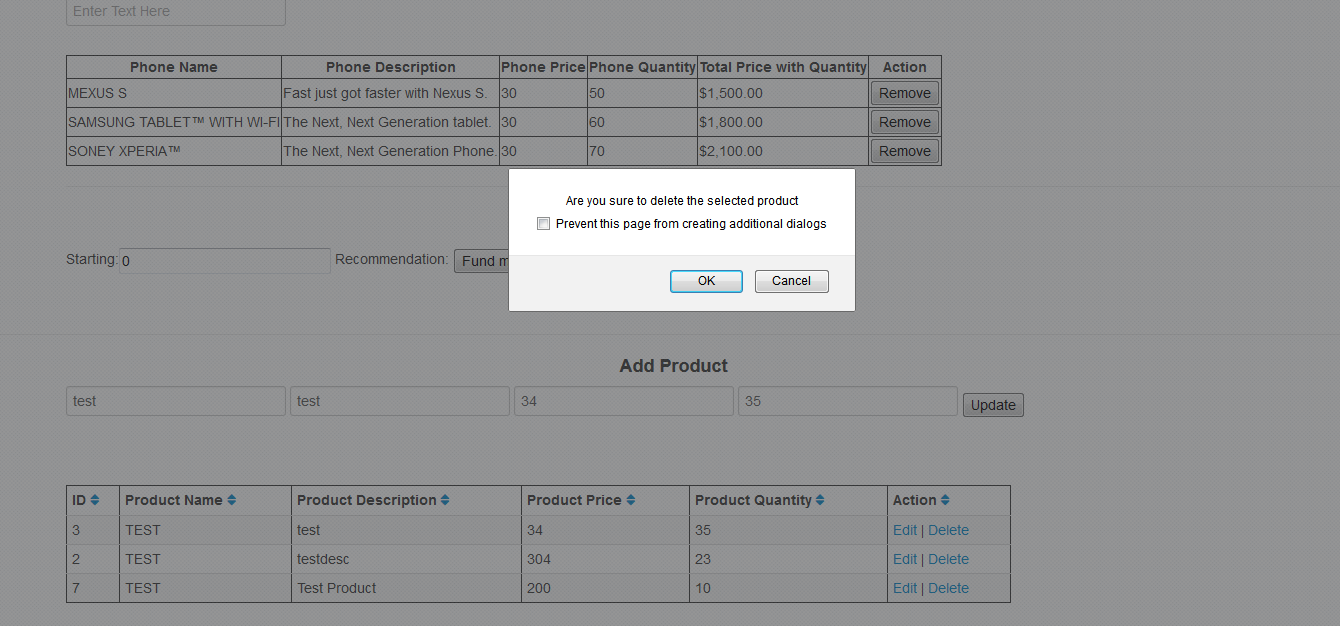
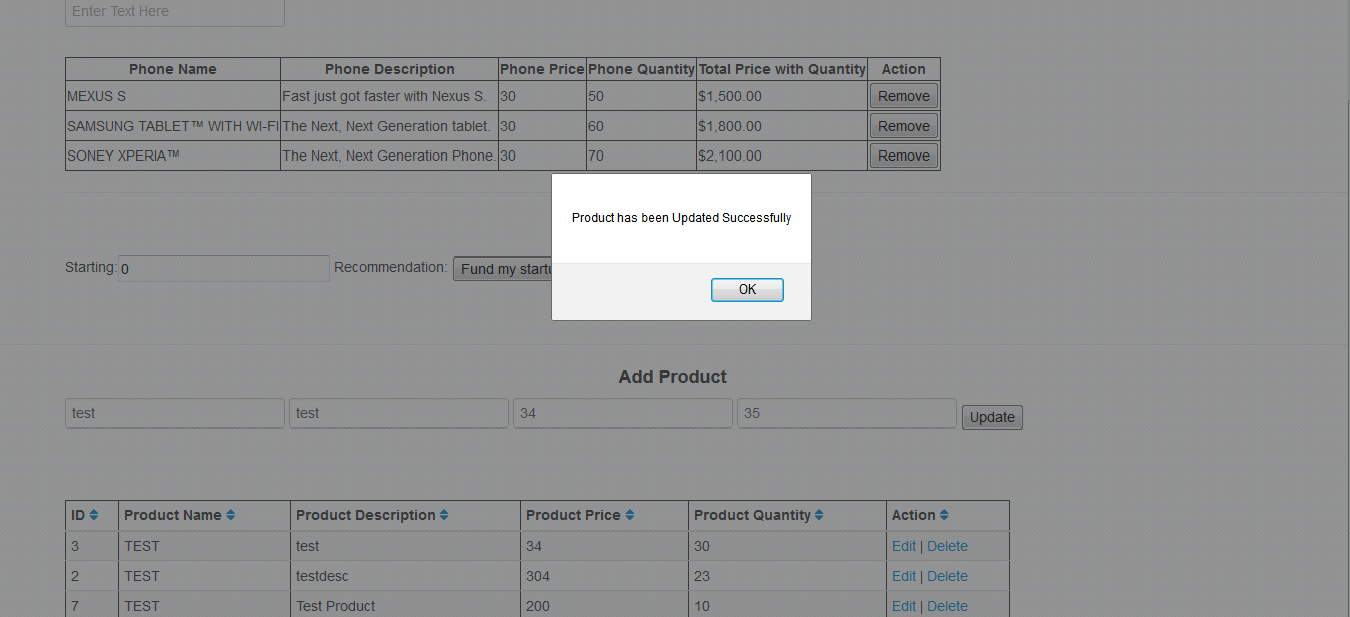
You can check the Edit and Delete function in action by below snapshots:
Edit Product
Delete Product